Since ediff-files and ediff-buffers result in apply: Searching for program: no such file or directory, diff error on windows machines.
How to compare two files using Emacs on a windows system?
Since ediff-files and ediff-buffers result in apply: Searching for program: no such file or directory, diff error on windows machines.
How to compare two files using Emacs on a windows system?


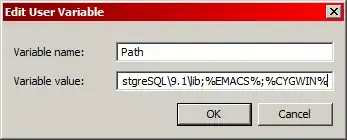
As @nanny said in comments, solution is having installed Cygwin with diffutils. Here is how to do it:
diffutils: A GNU collection of diff utilities package. This package can be found in Utils section in one of few steps of Cygwin installation.
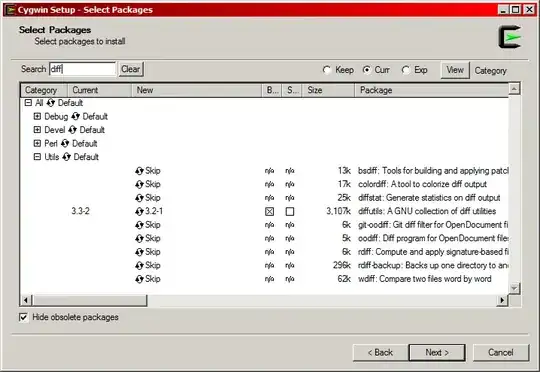
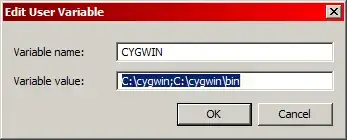 ;
;
After this you are able to call ediff-buffers, ediff-files and others successfully. Which looks something like this: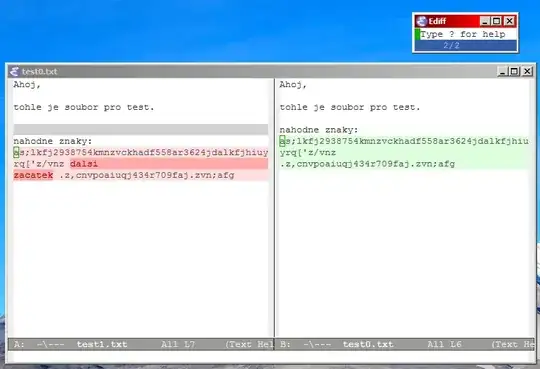
Enjoy!

If you have git for windows installed, then it is enough to add
C:\Program Files\Git\usr\bin\
to your PATH, because it already ships with a diff executable and installs it in that folder.

This may save people some time so I will answer here. If you do not wish to add the cygwin bin directory to your path (or any of the other ones suggested in the other answers), you can set the path of the program ediff uses by setting the variable ediff-diff-program. For example you could set it to C:\cygwin\bin (or whatever the actual path is in your case) if using cygwin. It took me some time to figure out which variable to set. Some that DID NOT work were: ediff-custom-diff-program and diff-command.
For example:
(setq ediff-diff-program "c:/CYGWIN64/bin/diff.exe")
does it.
If you use the command line installer https://scoop.sh/ you can get diff by typing scoop install diffutils in your prompt.

If you don't need to produce a diff, but just want to find the differences between the files, one way to do it is to use M-x compare-windows instead.
Open the two files such that you see both of them at the same time, move point to the beginning in both buffers, and run M-x compare-windows. It will move point to the first place where the files differ. This should work without any external executable.

